
Learn more about tree testing, its benefits, and how it can be incorporated into your unmoderated usability testing.
Note:
- Tree Test questions are available in modern surveys only.
- Tree testing is available at an additional cost. If you are interested in this feature, please contact your Customer Success Manager.
Overview
Tree testing is a research method used to learn and understand how users navigate and find content within your information architecture (IA), and even identify where users get lost. In a Tree Test question, participants review a category hierarchy (or tree) and indicate where they expect specific content to be found. The tree can have multiple levels. Each top-level nodes can expand to reveal child nodes, which in turn expand to reveal more nested nodes. A common application is to test navigation menus on websites or apps.
Tree testing can help you:
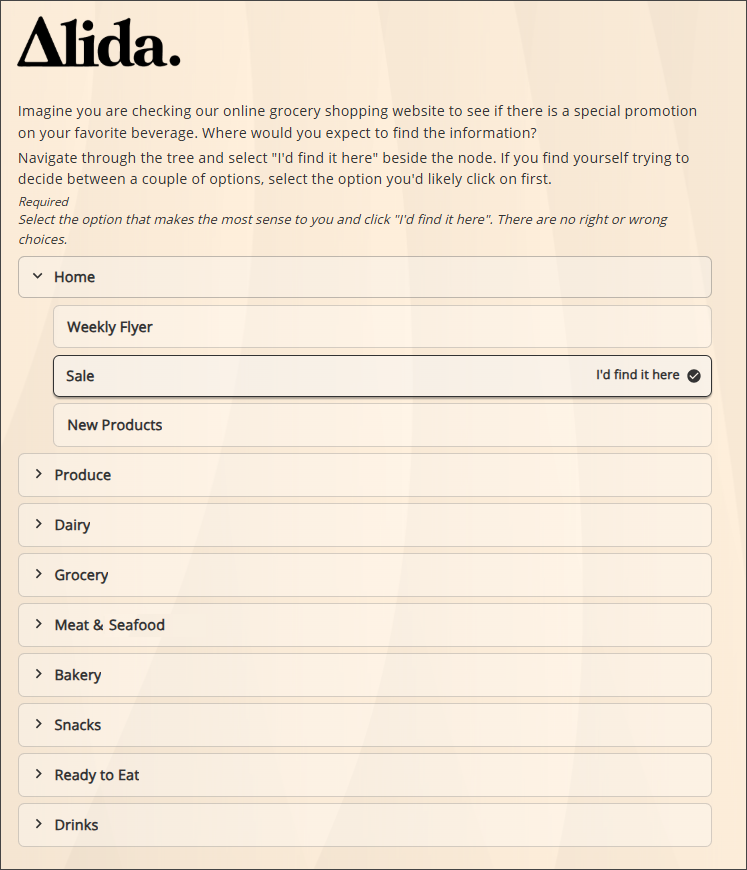
- Understand users' mental models: Tree testing reveals how and where users expect to find information on your website or app.
- Test the intuitiveness and effectiveness of information architecture: Tree testing helps ensure that labels, categories, and navigation structures are clear and prevent confusion and frustration.
- Practice user-centered design: Tree testing ensures that navigation structure aligns with user expectations, not designer assumptions.
Benefits of tree testing
Tree testing can improve the usability of your product in a number of
ways. Use tree testing to:
- Identify confusing paths, labels, and categories. Analyze success rates, user paths, and follow-up responses to understand users' context and state of mind when they stray from the intended user paths.
- Prioritize issues for iteration. Identify whether a handful of information architecture pathways are causing the majority of navigation problems for users, and prioritize fixing those first.
- Streamline navigation and eliminate duplicate paths. Simplify your navigation structure and figure out where to place important features for optimal visibility. If the majority of users pick path A over path B to find a piece of content, you may not need path B.
- Validate the results from prior card sorting activities. Present the navigation structure derived from how one group of users categorized ideas to a new group, and see if the information architecture resonates with a different audience.
- Work more efficiently. Testing early and testing often help prevent expensive rework later. Use tree testing at all stages of the design process whether you're testing a prototype, building something new, improving an existing structure, or checking that your information architecture is still working as intended.
Terminology
| Term | Definition |
|---|---|
| Tree | A text-only version of your app or website navigation structure, similar to a sitemap. |
| Node | An element within the tree's structure
(category or content). The node can be a:
|
| Level | The position of a node within the tree's hierarchy. |
| Task | The action participants are asked to complete as part of the tree test. |