
You can quickly monitor activities and statistics across multiple application instances, without having to sign in and out.
- Your account must be associated with multiple application instances to perform this task.
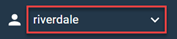
The application instance you are currently signed in to is displayed on the right-hand side of the navigation bar.
Click the application instance name on the right-hand side of the
navigation bar and select the instance to switch to from the drop-down list.
The selected application instance's
Home page appears in your browser.
Any activities you create or distribute, as well as their associated statistics and reports, will only apply to the application instance you selected.
You can switch between the following types of application instances,
if they are on the same pod:
- Community upgraded from Sparq 1
- Community
- Community with power surveys enabled
You can also log in using http://app.pod.alida.com as well instead of using the vanity URL, where pod is a placeholder value for your pod value. To determine your pod value, look at the URL after you log in to the Alida platform.
Tip: Once you determine your
http://app.pod.alida.com
login URL, bookmark it in your web browser so you can quickly access it again.